Friday, April 10, 2015

6 Ways to Get More Likes from People in Your Industry


6 Ways to Get More Likes from People in Your Industry


Industry Illustration


Facebook pages live and die by the quality of their audiences. It’s why buying thousands of cheap likes from Fiverr or whatever is a losing strategy. The people who end up following your page aren’t the same people who are most likely to be interested in your business – and consequently buy your products. You wouldn’t spend a grand on a paper mailer to every mailbox in Dubai, would you? Of course not; you wouldn’t expect anyone there to actually buy your products.


You don’t just want more people following your page. You want more people interested in your business and your products. If you’re selling baseball tickets, you want baseball fans, not a random selection of people you meet on the street.


How do you attract these fans? It’s going to come down to a mixture of organic and paid advertising, as does everything else in the Facebook world.


Network With Industry Sites


Email Marketing


Every industry has their authority sites. These are the giants, the news aggregators, the Gawker blogs, the major players and their websites. Your first step is to identify them. If you’re new to your industry, you might need to spend some time watching the way the traffic flows. Try checking the average number of shares and comments posts get when posted by a given company. Any above a certain threshold is a good potential source of traffic and followers.


Once you’ve identified these industry giant sites, you need to make use of that information. For some of these sites, you can approach them and ask for a minor partnership or a mention somewhere. For others, you can use established guest posting routes to get your name on their sites.


Another good strategy is to find the Facebook pages for these businesses and follow them. Watch the content they post, and when you find something within your area of expertise, comment on their posts. Whenever possible, add a link to a piece of your content to your comment. Other people reading that content will see your comment and will follow the link to your site.


This won’t bring in a huge volume of users, and you have a several step process to getting those people from Facebook to your site, back to Facebook, and liking your page. Still, even one or two per month is a valid turnover, and it will only scale up as your reputation grows.


You can do the same thing with influential individuals in your industry. Rather than the Microsoft page, you target Bill Gates’ page instead. Influencers can be much more personal than brand pages, and might have personal comments in response to your comments.


Learn Your Audience and Target Them


Target Interests


As you build your audience, Facebook starts to build a profile of those people. This is all found primarily within the Facebook Insights pane, and it’s most useful for running advertising.


Everyone on Facebook has a set of interests. This set is composed of pages that people like, as well as pages they interact with even if they don’t like them. There are other factors as well.


When you’re getting into ad targeting, come up with some of these interests. You might, for example, pick a general technology and a brand similar to yours, set those as interests, and advertise only to people who like both. This is called interest intersection targeting, and it narrows your audience more than specifically targeting fans of one brand would.


You can also target organic posts. At the bottom of every post you make through your page, you can set specific interest targeting, or you can use a custom audience you created earlier. Custom audiences are great, more on them later.


Advertise to Competitor Audiences


Competitor Audiences


This one is easy; just run advertising using the audience targeting factor of “likes X competitor’s page.” You can even run a specific ad targeting them explicitly; “Bob’s Widgets? Forget Bob, our deals leave him in the dust.”


You might want to avoid being too aggressive, particularly if you want to form partnerships with these businesses later. Don’t try to undercut them if doing so hurts their willingness to work with you.


Grow and Target a Mailing List


Mailing List


Mailing lists are great in their own right, but they can be used on Facebook as a custom audience. All you need to do is create a new audience and feed in your mailing list. Facebook will compare all of the email addresses in the list with their database. When they find a match, they add that user to your custom audience. Now you can run advertising targeting explicitly those people who already subscribe to your mailing list. This is very potent, because those people are among your most interested and engaged users.


Make Use of Lookalike Audiences


Lookalike Audience


A lookalike audience is an audience that shares the demographics and interest with your existing audiences. One great way to use it is with your mailing list audience; another is with your followers.


In any case, take your existing audience and click to create a lookalike audience. This will create a new list of people on Facebook who match most of the demographics and interests of the people in the original audience. Now you can run ads targeted at people who look an awful lot like the people who already follow you. Imagine if everyone who follows you had a twin, and those twins were all potentially interested in you; that’s what lookalikes bring to the table. You can, for the record, also use lookalike audiences on Twitter now.


Run a Relevant Contest


Enter to Win


Contests can be pretty useful for gathering relevant likes, but less so than they used to be. You can’t hide a contest behind a like these days, which hampers the number of people your contest brings in. On the other hand, you can use likes as additional entries, which helps.


Just make sure when you’re running a contest, that you offer a prize that’s relevant to your business. A copy of your ebook or your product is generally the best idea. Otherwise, you risk bringing in a lot of people from Slickdeals or somewhere, all who just want the deal or the free item, none of whom will ever interact with your page again.


The post 6 Ways to Get More Likes from People in Your Industry appeared first on Boostlikes.com.


Posted on 3:46 PM | Categories:

How to Set Up Conversion Tracking on Facebook Ads


How to Set Up Conversion Tracking on Facebook Ads


Conversion Tracking


Running ads is a good thing. You get more people coming to your site, and consequently, more people buying your products. If I asked you over lunch one day – think of your favorite restaurant, we’re probably eating there, I trust locals when I travel – how many of those people convert, what would you tell me?


A savvy marketer, the kind I really like to see has traffic statistics on hand. You’ll know exactly how many people your ads funnel in, and you’ll know how many of those people convert. You’ll have plans in mind to refine your targeting, make better ads, and boost your conversion rate.


All too often, I talk to novice marketers who just don’t have an answer for me. How many people come in through their ads? Oh, they probably know, in general. After all, Facebook gives them a nice and easy reading there. How many of them convert? That’s where the data breaks down. They know total conversions in the given time period, but they don’t know how many came from Facebook versus how many were organic or from other ads.


This is where conversion tracking comes in. With conversion tracking, you put a little piece of code on your site and it in turn puts a little bit of code on the computers of the people clicking your ads. This allows you to harvest data specifically from those people, using Facebook’s Insights.


The Facebook Pixel


Tracking Pixel


All of this code comes in the Facebook Pixel. Also known as the offsite pixel, it’s a bit of code you find on Facebook, generate with specific parameters relevant to your ads, and add to your site. You can read all of their techno-documentation here.


The tracking pixel gives you a lot of information. For one thing, it shows you just how many of your visitors came from your ads. It can also show you just how many of those people converted. That’s the absolute most basic level of functionality.


Facebook can create a custom audience made up of the people who have clicked your ads. This allows you to run special remarketing campaigns. You can run similar campaigns based on anyone who visits your site, regardless of where they came from. You can also build a list of people who converted, and exclude them from the remarketing; no reason to show your ads to people who already bought your product, right?


Optimizing Ad Spend


Another feature of the pixel is the ability to use it to control your ad spending. You do this by setting a type of conversion for your ad. For example, if your ad is geared towards getting people to buy a product, you would want to spend differently than if your ad was geared towards getting people to fill out an opt-in form. It’s much like ad objectives, only it helps Facebook determine who among your audience is most likely to convert. This is, of course, only relevant if you’re using oCPM instead of their other payment types.


Step 1: Make the Pixel


To make the tracking pixel, you need to use the Facebook Power Editor, which means you have to be using Google Chrome as your browser. With the toolbar active, click the top-left menu and click down to conversion tracking. Next, click to create a conversion pixel. Name the pixel and choose the conversion category.


Step 2: Implement the Code


Tracking Code


When you click to create the pixel, you will be presented with a box full of code. This is javascript, and it contains all of the information you need to track your conversions. To implement it, you need to paste it onto specific pages of your website. Which pages?


Depending on the action you want completed, you paste the tracking pixel in a different place. For example, if you want people to buy a product, you might put the code on your checkout completed page. If you want users to fill out a form, paste the code in the “thanks for submitting” page. The concept is the same regardless of the action; a page that only users who perform the desired action can see.


As for where you paste the code specifically, it needs to be in the <head> tags of your HTML of that page. If you’re working with raw code, it’s easy enough to do. If you’re using a CMS like WordPress, you’ll have to use their system to edit it in, usually through a “Custom Tracking/Conversion Code” box.


Step 3: Verify


Once you’ve pasted in the code, check Power Editor again. There will be a list of tracking pixels – you can have more than one for different actions – with status indicators. Unverified means there may be an issue with your pixel. Active means someone has visited that page and Facebook successfully tracked them. Inactive means the code is functional, but no one has visited the page in the last 24 hours.


If you’re having issues with your pixel not working, Facebook has a tool that can help. It’s called, fittingly enough, the Facebook Pixel Helper.


Step 4: Make Ads


In order to track on an ad-by-ad basis, you would either have to make and implement a different pixel for each ad, or you would have to set it in your ad itself. Thankfully, Facebook opts for the latter option.


When you create an ad, click over to the Creative & Placements tab, and click conversion tracking. This will bring up a list of pixels and other tracking codes, from which you pick the one you want to track. Make sure you pick the right one! You don’t want to track the wrong page and record ineffective conversions.


That’s it. With the code active, and an ad active, you’re all set. When a user clicks the ad, they’re tracked. When they convert, they’re tracked as well.


The post How to Set Up Conversion Tracking on Facebook Ads appeared first on Boostlikes.com.


Posted on 12:46 AM | Categories:

Wednesday, April 8, 2015

How to Deal With an Upset Facebook Reviewer


How to Deal With an Upset Facebook Reviewer


Bad Review


Facebook’s business pages are incredibly helpful, and they have a lot of special tools just for businesses. One such tool is their review function, which allows users to see the comments left by other users who have visited your location.


But I Don’t Have Reviews!


Well, if you don’t have the reviews section on your page, what are you doing reading a post about removing negative reviews? If you have a negative review you want removed, but it’s not in the reviews system, it’s probably just a post on your wall. You can delete those with ease and with no repercussions. Just remove it and, if necessary, block the user who left it.


The reviews system is a Facebook “app” that’s a special function specifically for one kind of page; local businesses. It only works if you have a physical location, because it’s tied to the check-ins function. Unfortunately, it’s also tied to the maps function. If you want one, you need the other.


Removing Reviews


1 star


So, you’ve had someone leave a scathing negative review on your page, and you want it gone. Can you just delete it and move on with your life?


Unfortunately, you can’t. There’s only one way a single review can be removed from your page, and that’s if Facebook themselves decides to remove it. Facebook explicitly won’t listen to you when you ask for a review to be removed, unless it’s clearly spam. If the review happens to be spam, you can mark it as spam, which will flag it for review by Facebook. I’m going to be honest here, it’s going to take Facebook a long time before they get around to reviewing and removing it. This isn’t a very good solution.


If you want to take a more proactive approach, you can hire a reputation management company to contact Facebook on your behalf. They’ll be considered an impartial third party and will have more sway over Facebook’s decision, not to mention getting them to act before the next glacial age.


Really Removing Reviews


The only way you can directly remove your reviews is by removing all of your reviews. That’s right; all of them. If you happen to have two or three five-star reviews and a flood of 1-star reviews, this is probably a good idea. If you have a few hundred or a few thousand 4 and 5-star reviews, but you’re concerned about a couple of recent 1-2 star reviews, this is probably a worse choice.


In order to remove your reviews, you need to hide the reviews app. First, click to Update Page Info. Click on the Address section and look beneath the map. You’ll see a checkbox tat says “Show map, check-ins and star ratings on the Page.” You have to un-check this setting in order to hide, well, all of those things. Be warned that you’ll be hiding your map as well, so if you’re in a hard to find location, you might want to think twice about hiding it.


Review App Alternative


Third Party


If you want reviews, or if you want a map, but you don’t want to be as limited as you are with Facebook’s system, you can create your own app. To do this, you’re going to want to create a tab app microsite. You can do this in a few ways, typically using third party services, though a developer in your employ can probably create one.


Essentially, what you want to do is create one or two tab apps. One can be a simple Google Maps integration to give map functionality to your page. Unfortunately, it won’t display on the page the way a map through Facebook displays; it’ll just show up as any other tab app. This is the biggest drawback to using tab apps in place of Facebook’s feature.


For the reviews app, you’ll want to do the same thing. A simple star scale and text submission field works, so you can mimic Facebook’s functionality. The only difference is you’re able to control those reviews, vetting them for spam before they submit, or removing the least relevant reviews before they hurt your business.


Of course, you can only really do this for Facebook; it doesn’t help you when it comes to reviews on Yelp or another third-party site.


A Word of Warning


Before you go vetting all of your reviews, remember that users are naturally skeptical of businesses with nothing but high reviews. It will be incredibly transparent if you’re removing all of your low reviews on Facebook, but they still exist on sites like Yelp. You can expect to be noticed and, if you’re sufficiently high profile, you might find your plan backfires as social media and sites like Reddit pick up and run with exposing your secret.


You can also use low reviews as a customer service opportunity. Facebook allows you to respond to reviews, both positive and negative. You can thank users who leave positive reviews and gain a bit more goodwill out of it. For negative reviews, you can put your customer service hat on and ask them how you can make it better. This helps you gain fans out of people who had a bad experience with a dead on arrival product or bad shipping.


A certain number of negative reviews are natural. If you’re lacking any negative reviews, people will be a bit more suspicious. This only gets worse the more reviews you get, and the more control you have over those reviews. Using Facebook’s reviews feature is a way to keep the ball in the court of the fans, which helps assure them that the review distribution is legitimate. You really are just that good.


Just make sure that when you’re responding to reviews, you’re doing so in a brand voice. You don’t have to be corporate, and you should probably avoid rote copy and pasted “please contact our support” responses, but even those are better than the dramatic social media explosions that seem to happen several times each year.


The post How to Deal With an Upset Facebook Reviewer appeared first on Boostlikes.com.


Posted on 9:46 PM | Categories:

Tuesday, April 7, 2015

What to Do After Facebook Removes Likes from Your Page


What to Do After Facebook Removes Likes from Your Page


Likes Removed


Some pages in the last month or so have been seeing an interesting notification appear on their page. They log in one day and see a message at the top; Facebook has removed some fake likes from this page.


For some, this sends them into a panic. For others, it’s a minor nuisance. Still others ignore it entirely. What happened?


Well, Facebook has been on a crusade against like scammers and fake likes. Fake likes hurt the usability of the site, and as such, they’re penalizing pages that accumulate them, penalizing accounts deemed fake, and trying to ban anyone who runs a fake like service. Periodically, they remove fake likes from a page. In the past, there was no real notification of this. You might notice that Facebook announced a purge, and it coincided with a drop in your follower count, but that was all. If you didn’t notice, or you weren’t hit very hard, you might only see the minor fluctuations that come with running a page. After all, people unfollow pages all the time.


Now, though, Facebook tells you when the drop in likes is associated with the actual removal of fake likes. This is often caused by the removal of those fake like accounts, though it sometimes comes from the removal of inactive accounts. So what should you do when you see this notification?


Determine Where the Fakes Came From


Investigation


The first thing you should do is make an attempt to determine where the fake followers came from. There are a few possible sources, though you probably won’t be able to pin down exactly which caused it.


  • Natural accumulation. These days, fake like bots are fairly sophisticated. They will rove Facebook naturally looking for pages to like, even though they aren’t specifically paid to follow you. This activity makes them look more natural and thus harder to identify as being bots. If a flock of accounts all like the same pages in unison, they’d be very obvious and easy to ban. What can you do about this? Nothing, unfortunately.

  • Facebook ads. Facebook’s ads have a tendency to accumulate fake likes in addition to real, valuable page follows. This is for the same reason as the previous bullet; bots want to hide themselves. If they’re inside your target zone for ad targeting, they’ll probably click on your page and like your business. What can you do about this? Ideally, refine your ad targeting to exclude the characteristics of like bots, like geographic location.

  • Purchased likes. Often, inexperienced businesses will purchase Facebook followers, hoping to receive legitimate, real followers. Unfortunately, purchasing from cheap sellers tends to bring in more bots than anything else. Even if your business moved on from these techniques and has been purely white hat since, those old bots still linger. It’s possible old follows were removed. What can you do about this? Just don’t buy likes from an untrusted seller. Real sellers of legitimate likes are more like third party ad campaigns than Fiverr gigs.

  • Negative Like Attacks. Since buying fake likes is generally cheap, sometimes a business will buy them for a competitor, in an attempt to dilute their message and make it harder for them to reach their customers. If you notice an unexplained surge in your follower count, it’s possible you’ve been the target. What can you do about this? Monitor your likes and make sure you remove bad likes as they come in. You should also report them to Facebook.


Stop Activities that Bring in Fake Likes


Throwing Money Down the Toilet


Once you’ve determined where the fake likes probably came from, you’ll have some idea whether or not it’s an action on your part that caused them. If it was, you should take steps to stop that action. For example, if you’re buying fake likes from a low quality seller, you should stop paying that seller for their services and cancel any contracts you have.


If you determine that your ads are to blame, look into better targeting. Chances are, you’re going to want to remove certain geographic locations and languages from your targeting. Even if you lose the occasional rare rich Indian customer, you make up for it with a wider reach and greater influence on Facebook.


Audit Your Remaining Likes


Facebook does not make it easy to audit your likes. The best you can do is view the most recent few hundred followers. You should scan as many of them as possible looking for fake followers. What do fake followers look like?


They tend to share a number of common characteristics. They have very little information posted on their profile, and may not have pictures at all. If they do have pictures, those pictures might be commonly shared – check them with a reverse image search. If a fan looks fake, remove them and refresh the list to add another to the bottom.


Eventually, Facebook will stop displaying more fans. When this happens, you’ve done as much auditing as possible. Until Facebook expands this capability or allows a third party user to hook into your follower list to audit them, you can’t do any more.


Establish Fan Monitoring


Monitor


Now that you’ve done what you can to minimize the number of fake followers you still have on your page, you need to establish a program of monitoring your incoming followers. Each day, when new users follow your page, check those users. Try to make sure they’re legitimate users, and not spambots or like bots. If they’re fake, remove them. The only way to truly keep ahead of the problem is to be very proactive, and even then, it can be a full time job for pages with millions of fans.


Work to Grow More Legitimate Likes


When it comes time to replace those fake likes, you need to make sure you’re getting legitimate followers. There’s a lot that goes into this, but here are a few general tips.


  • Post content. Post more content more often, on a consistent schedule. When you leave large gaps in your posting schedule, users won’t want to stick around and like your page, meaning a higher percentage of the people who do like you are fake.

  • Engage your fans more. When you engage them, they post more, and thus share your posts more often to their friends. This increases your reach and gets more word of mouth followers.

  • Target your ads appropriately. Remove countries known to farm out likes, or really any country in which you don’t sell products. If you never sell anything to anyone in Thailand, why bother running ads to people there?

  • Grow a reputation outside of Facebook. A mailing list, a good blog, an active Twitter; these all help you find other sources of verified good fans. There’s not a lot of crossover between fakes on platforms; a fake Facebook user won’t also be a fake Twitter user. This helps you leverage different communities into one larger community.


In general, just keep an eye on your likes as you get them and strive to get them from legitimate sources. If done properly, your likes should grow naturally and with highly interested users.


The post What to Do After Facebook Removes Likes from Your Page appeared first on Boostlikes.com.


Posted on 6:45 PM | Categories:

9 Facebook Marketing Hacks: Tips & Tricks to Grow Your Audience


9 Facebook Marketing Hacks: Tips & Tricks to Grow Your Audience


facebook hacks for marketers


Facebook frequently makes changes to its News Feed algorithm, making organic reach a bit more challenging for brands. Of course, it’s only natural for Facebook to enhance its platform to ensure the most relevant content gets to the right people, but that also means marketers need to adapt alongside it. In other words, they need to get scrappy.


To that aim, we asked our community—you—for the best Facebook hacks that make managing your workflow and growing your audience a little less taxing. From organic to paid, here are the top tips and tricks from you and your peers.


1. Keep Ads Conversational


Facebook Ads are a great way to connect with your audience quickly. If you haven’t started exploring Facebook advertising, now is the time start. Once you’re set up, keep your ads as conversational as possible (credit to tipper @plumblegum). At Sprout Social, we often pose questions to generate greater engagement.


facebook ad screenshot sprout


Gerry Graf, Founder/Chief Creative Officer of Barton F. Graf 9000, agrees with this approach, touting the power of authenticity.


“Whenever a company or brand speaks, we’ve all been trained from growing up in front of the TV to tune out the message,” Graf told Facebook. “We block out ad speak. Anytime I’m doing an ad, I like to think the way humans speak. When you’re talking that way, peoples’ defenses are lowered. They know you’re not just totally full of crap.”


“Anytime I’m doing an ad, I like to think the way humans speak.”

—Gerry Graf, Founder/Chief Creative Officer, Barton F. Graf 9000


2. Optimize Images With the Right Fonts


Using imagery in your Facebook posts is a good way to increase engagement. But “how about using a good mixture of fonts on the brand message pic?” suggested tipper @socialzyka.


This trick can help you determine what visual tone resonates best with your target audience. To get started, consider this list of the most popular web fonts (backed by data).


most popular fonts for social


Also, if you want to avoid breaking the bank—and who doesn’t?—here’s a list of free web fonts as well as some graphic design tips for social media.


“How about using a good mixture of fonts on the brand message pic?”

—@socialzyka


3. Clean Up Your Images


Are your images showing up blurry on Facebook? Sprout’s Darryl Villacorta (@themiddle) offers a Facebook hack that will keep those images crystal clear every time.


“When creating an image in Photoshop, make sure your DPI is set to 300,” Villacorta said. “When your masterpiece is finished, be sure to flatten the image. Hold on, you’re not done yet! Open a NEW document with identical dimensions and settings. Navigate to your original document, and drag over the flattened image to the new document window. Once you’ve aligned everything, be sure to saves it as a PNG file and for web and devices.”


If you need to know all the Facebook image sizes, or are having trouble with sizing images across other channels, refer to our social media image sizes guide.


4. Target Locations & Languages With Organic Posts


Did you know it’s possible to target audiences by location and language—at absolutely no cost at all? Here’s how:


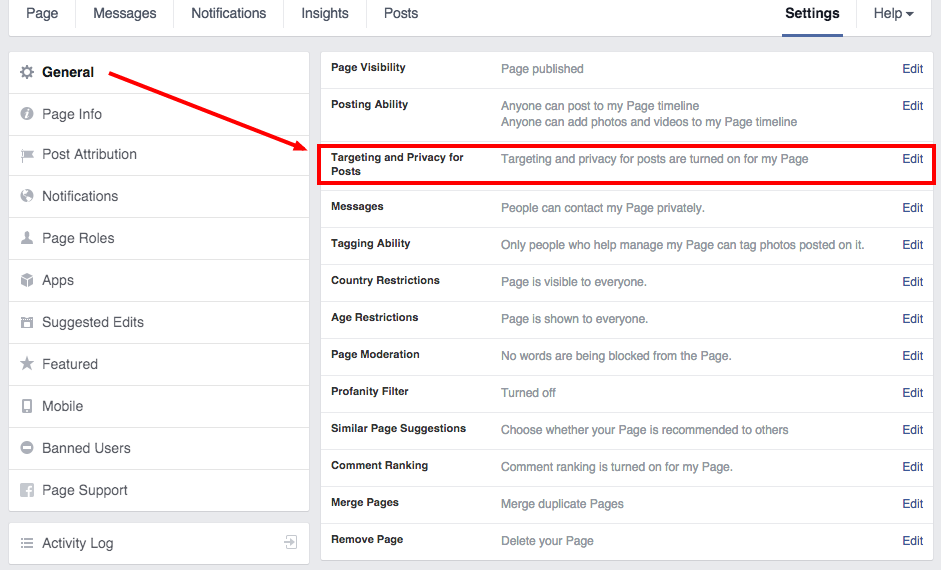
  • Go into your Facebook Page Settings.

  • Under General, enable Targeting and Privacy for Posts.


facebook targeting screenshot


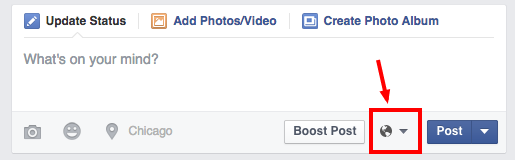
  • After that, you’ll see a globe icon within the field, where you enter your status.


facebook targeting screenshot 2


  • From there, you’ll be able to target by both Language and Location. Location is broken down by:

    • Everywhere

    • State/Province

    • City


5. Create Recurring Content That Keeps People Interested


Give people something to look forward to on a weekly or biweekly basis. A series of posts will build momentum and create awareness around your brand (credit to tipper @itsCaitlinP). Here’s an example of this tip in action with our Meet Team Sprout campaign:


facebook reoccurring content example


6. Use Ads to Test Your Content


With digital marketing, it’s important to test everything you can. Facebook is no exception. So if you want performance feedback from your Facebook posts, try turning some into Facebook Ads.


You don’t need to a big budget for this either. Craig Glaser (@CraigGlaser) advocates using as little as $1 to boost your posts to a larger audience.


“If a post if not gaining much traction after 24 hours, boost it for $1 for 24 hours,” Glaser said. “It’ll give it a turbo boost and send it sky rocketing for minimal cost.”


Here are some of the content components you can test:


  • Messaging

  • Ad copy

  • Images

  • Calls to action


“If a post if not gaining much traction after 24 hours, boost it for $1.”

—Craig Glaser (@CraigGlaser)


7. Tag People & Brands


An easy way to spread your reach is to tag other people or brands within your Facebook posts. Thanks to a recent Facebook News Feed algorithm update, tagging another Page improves your chances of reaching that audience as well. Just make sure you  have a reason for tagging another Page, otherwise it seems forced (credit to tippers @jesephm and @itsCaitlinP). Here’s an example of tagging other Pages:


tag people on facebook8. Write Specific Metadata & Page Titles


When posting on Facebook, you probably sometimes change the title and description in the linked content. The Content Stop suggests taking this a step further with the following advice: “We are noticing a big upswing in engagement rates on clients pages from adjusting the metadata and titles of a post to serve a specific niche (of course the copy is killer as well), then advertising that to that niche through a $2–$3 post boost.”


In a nut shell, personalized posts make people more likely to click through your posts.


9. Engage at Every Level, From Colleagues to Customers


Engagement is key on social. Whether you’re part of a big corporation or independent business, employee advocacy should be fundamental to your social strategy. Start by encouraging your employees to share relevant industry and workplace news on Facebook (credit to tipper @MarinighPR).


Meanwhile, as a brand, be sure that you are not just pushing out content but that you are also actively listening and responding to your fans. With a staggering five out of six messages left unanswered on social, this could be to your competitive advantage.


The right tools will help. A social media management platform such as Sprout enables brands to scale their social engagement efforts and communicate with their audiences more effectively. You’ll get actionable feedback from our integrated analytics on how you can improve your strategy to expand your audience even further.


The post 9 Facebook Marketing Hacks: Tips & Tricks to Grow Your Audience appeared first on Sprout Social.


Posted on 8:47 AM | Categories:

Monday, April 6, 2015

“We’ve Removed Some Fake Likes” Warning on Facebook


“We’ve Removed Some Fake Likes” Warning on Facebook


Weve Removed Some Fake Likes


Recently, Facebook has started sending out notifications at the top of a page, visible only to the admin, when they remove fake likes from that page. This has set a number of webmasters on edge. Many believe that any loss of likes, real or fake, is a huge blow to their business. I’m going to take a moment to discuss why that’s not true, and why this is typically a good thing, no matter what percentage of your likes are removed.


Why Authentic Likes Matter


Well, for one thing, Facebook cares about the realism of their likes. If the site was overrun by fake likes, the fake like economy would crash. Where you might find one like valuable before, you might need a thousand likes for equivalent value. Pages with millions of followers would need trillions of likes on every post just to break even, and that hurts everyone.


Okay, so that’s not really what happens. However, a like on a page is supposed to signify a person – a real person – who is interested in your brand and what you have to say. When your page is full of followers, you have a wide interested audience. If your page is filled with fake likes, you might as well be delivering a seminar to a bunch of cardboard cutouts. Not only does it hurt your message to fall on fake ears; the few real followers in the crowd of fakes grow uncomfortable and leave.


Facebook also doesn’t like giving pages a workaround to their feed filtering. If they weighted likes more heavily, it would be possible for pages to purchase likes just to spread their message. In a sense, it’s because of fake likes that the individual like is as valueless as it is today.


Fake Likes and Insights


Insights


If you’re a veteran Facebook marketer, you’ll know how valuable the Insights system is. Through Insights, you can learn all sorts of interesting and useful information about your audience. You can find out where they live, in general. You can find out what they like. You can find out about their general demographic information. Most importantly, you use this information to target your ads.


Consider this scenario; you go into your Insights panel and look at your demographic information. You see that the majority of your audience is composed of young women, aged around 20, and that they tend to like various clothing brands. Use decide to use that information to target ads at other 20-something women who like clothing brands, to bring them into your audience. It works, and you bring in a number of great new followers, some of whom convert on the spot. That’s how the system is supposed to work.


Now imagine you look and you see the same information, but you notice that the majority of them come from India. This is strange, because you don’t sell your product in India. You shrug and decide to run the ads anyways. You get a whole bunch of new followers, but you see exactly zero conversions. You spent a bunch of money on ads, and got nothing out of it. It’s even worse if you spend money on other ad campaigns in India, where people don’t actually care.


Things get even worse if the fakes spoof their identities and look like they come from, say, California. Now you have a bunch of valley girls as your demographic. What if the minority, though, are your real fans? They turn out to be 40-something males who live in New York. Yet here you are, spending ad money on ads targeted at California women. Your real demographic is left ignored, while the fake demographics suck up your ad spend and give you nothing in return.


There is, of course, the matter of organic reach as well, which is severely hampered by the presence of fake fans. Every fake fans that sees your message is a real opportunity lost.


Facebook’s Best Practices


Facebook Policies


Facebook has a few suggestions on fan-based best practices.


First, they advise that you focus on business objectives, not just followers. Yes, growing your following is important, but which matters more to you? Getting an extra hundred followers on Facebook, or getting one more monthly conversion on your website? By running ads and targeting posts such that you’re encouraging conversions and blog followers, you benefit more than you would through boosting your like count for no reason.


Second, don’t buy fake likes. About half of the time when you’re buying likes online, you know they’re fake and you know what you’re getting into. Don’t do it, no matter how tempting the offer may sound. The other half of the time, the seller is trying to pass their likes off as real. They’ll just end up removed, or worse; sitting around hurting you. Only buy likes from qualified sellers, businesses that run ad campaigns on private networks to get you real followers.


Third, learn your audience. More importantly, monitor your audience and watch for trends in an unusual demographic spiking. This can be an indication of fake likes, which can come from outside sources as well as your own accidental targeting mishaps. Try to minimize the actions that cause these spikes.


Why Fake Removal is Fine


If you get the fake like removal message – something like this – consider it a good thing. Facebook has your best interests in mind! They’re removing bots, fake accounts, spam accounts, inactive accounts, and memorialized accounts from your followers list. This has a number of great effects on your brand.


For one thing, it makes your audience Insights that much more accurate. Always check your Insights after such a fake fan removal! You might find out you’ve been targeting your ads a bit left of center, and the removal allows you to refine your targeting to better contact the people who are most interested in your brand. This will probably result in a conversion rate increase, possibly as soon as days after it happens.


For another thing, it broadens your reach. When fake fans are removed, those fans aren’t soaking up your messages. Instead, real fans will see your posts, and those fans will be more likely to like, share, and comment on your posts. When they do, it exposes your posts to that many more real and potential fans, dramatically increasing your organic and viral reach.


The only negative effects that come up from the removal of fake likes are the lowering of your follower count – which isn’t that important on its own – and the loss of any investment you had in fake followers. But then, you’re a smart webmaster; you haven’t been buying fake likes at all.


The post “We’ve Removed Some Fake Likes” Warning on Facebook appeared first on Boostlikes.com.


Posted on 11:45 PM | Categories:

Saturday, April 4, 2015

How to Increase The Number of Likes on Your Facebook Posts


How to Increase The Number of Likes on Your Facebook Posts


Likes on Your Posts


Likes on a Facebook page are the bread and button of post engagement. They’re the cheapest and most boring form of engagement. When a user likes your post, that post is displayed to their friends the same was as if they had shared it, only it doesn’t have quite the same reach or format. Likes also don’t operate as comments; they’re not discrete events you can respond to, so you can’t leverage them into more engagement in the form of a conversation. On the other hand, people are far more likely to like a post than they are to share or comment on it.


On the plus side, a post with a lot of likes will also likely have a lot of other engagement. It’s circulated and seen by a wide range of people, some of whom might even like your page just so they can comment on your post. It’s worth encouraging likes, you just need to know how to do it. Here’s a few ideas you can try.


Run a Facebook Contest


Facebook Contest


Contests are tricky. You can’t require a page like as an entry method these days, Facebook banned the practice. You also can’t run contests in the news feed via organic posts, it’s against the terms of service. Yes, a lot of people still do it, but they can get in trouble for it. You don’t want to get in trouble, do you?


You need to run a contest in a tab app, but that doesn’t mean you can’t post about it on your feed. People like posts about contests, and you can ask for likes on those posts in order to spread awareness of the contest. Just don’t insinuate or imply that you’re awarding those likes; that can count as paying for the likes, which is another TOS violation.


Time-Sensitive Deals


Facebook Flash Sale


Run a quick promotion or coupon deal on Facebook. It doesn’t matter too much what it is; it could be a 5% or 10% discount, or a free minor bonus alongside a purchase, or anything else you can give out. The point is to make it time-sensitive. When your deal only runs for a few hours, you can then ask users to like it if they claimed it. It’s simple, it’s easy, and it gets a lot of minor engagement. You can even follow it up with another post later asking for feedback, what might make the deal better, if you should run another at another time, whatever. The exact question doesn’t matter; you’re just soliciting comments and conversation.


One tip that Wishpond likes is to add a like pop-up to your tab apps, no matter what purpose they serve. You aren’t like gating, but you are distracting users with a like pop. Users are often used to gates, so they may like your page thinking they have to in order to access your content. These get you page likes rather than post likes, but more followers means more exposure and more potential engagement, so it all works out.


Consistent Posting


Post Consistency


Opinions vary on how often you should post, and how much of any given type of content you should post at a time. I can’t give you exact answers; you’ll have to experiment to figure out what works best for your business, your industry and your audience.


In general, you definitely need to be posting every day. However, you also need to minimize the number of direct sales and advertising messages you post in a given week. I recommend shooting for under three such messages in a given week, though you may be able to get away with more if you’re posting a lot.


The rest of your messages should be divided between non-sales talk for your brand building, and non-branded messages. Non-branded messages should outweigh the others, because you’ll be curating content from other sources. By bringing interesting industry content onto your page, you’re encouraging people to use your page as a resource. When they turn to you, they’ll like your posts.


Run Facebook Ads


Facebook Ads


Facebook ads can be very cheap, if you’re targeting properly. Run promoted posts – news feed ads – with audience targeting specifically to get your post in front of more of your followers. A simple infusion of a few dollars every day helps keep your reach high and your posts visible.


Try to avoid boosting posts mindlessly; the targeting is too broad and you’ll end up showing your posts to users who don’t want to see them. Instead, use a custom audience made up of your audience, with the addition of a lookalike audience or a friends-of-followers audience, if you choose.


Your goal with these ads is strictly visibility. As such, you want to make sure the posts you promote are your branded posts, even though you’re posting much more often with content that’s not branded. There’s no reason to pay actual money to promote content that pushes your users onto a website you don’t own, after all. Only pay to promote the content you create in the first place.


Experiment with Post Formats


Facebook Experiment


Everyone has their own favorite types of posts, but some work better than others at attracting attention. Here are some post styles you can adapt to your industry.


  • The Simple Solution. Offer a problem and then a solution in one post. “One little-known method for saving a wet tablet; bury it in rice!” Bonus points if you have a picture that illustrates the problem and solution in a clear manner.

  • Caption This. Post a picture, ideally from your product or a recent event, and ask for captions. You can reward the best caption with some recognition from your brand, or you could have an actual prize attached.

  • Fill in the Blank. Ask an open-ended question with a blank for users to fill out. Tie it in with your promotions or products in some way for added value.

  • Nostalgia. If there’s anything the current generation of 20- and 30-somethings are into, it’s nostalgia for their childhoods. The 80s and 90s were, for many young adults, something of a golden age. Appeal to that nostalgia and win favor with the younger crowd.


Find post styles that work for you and use them. Try not to over-do them, though, lest you look transparent.


The post How to Increase The Number of Likes on Your Facebook Posts appeared first on Boostlikes.com.


Posted on 10:01 PM | Categories:

Friday, April 3, 2015

The Pros & Cons of Using Hootsuite to Manage Your Pages


The Pros & Cons of Using Hootsuite to Manage Your Pages


Hootsuite


Here’s an interesting little game you can play. Look up any variation of “social media management tools” on Google. Try to find top 10 lists or highly recommended suites, that sort of thing. I challenge you to find a list that doesn’t include Hootsuite, isn’t “alternatives to Hootsuite” or doesn’t begin with “well, I used Hootsuite and such and such an issue happened, so I had to change.” They’re hard to find, just because Hootsuite is such a dominant force in the industry. So, let’s add our voices to the pile; what are the pros and cons of using Hootsuite to manage your social media accounts?


Pro: It integrates pretty much any social network you could want to use.


Integration


Hootsuite advertises connections with “over 25 social networks,” though they don’t list specifically which networks. You can assume, however, anything with a sizable population will be available. Facebook, LinkedIn, Twitter, Google+, Pinterest, YouTube, etc. should all be available. If you want something new or lacking in an API, like Ello, you might have to contact their support, suggest the feature, and wait to see if they ever implement it.


Pro: Great integration with other tools, like MailChimp or Slideshare.


Mailchimp


Hootsuite tries to be an all-in-one system to manage your entire online presence. You probably don’t want to replace your website dashboard with it, but it can manage your mailing list easily enough.


Pro: It has long been one of the best tools to use for post scheduling.


Scheduling


Heck, one of the first major uses for Hootsuite was scheduling posts for times when you weren’t around to post them yourself. Now there are a whole host of scheduling tools, including automatic schedule so your posts go out at the same time every day regardless of when you make them, no need to plug in the details every time.


Pro: It has surprisingly deep insights that combine native social analytics – Facebook Insights, etc – with Google Analytics and its own tools.


Social Analytics


Professionals will tell you that analytics and insights make or break a social media campaign. The insights that Hootsuite provides are second to none. They compile data from Facebook Insights, Twitter Analytics, Google Analytics, and any other analytics suite on any other social network you use. On top of that, they have their own analytics tools filtering the data, so you have pretty much every piece of information you could want for any post you make. It’s not without drawbacks, though, which we’ll talk about later.


Pro: The apps are available everywhere including their little Hootlet.


Hootlet


Want to use Hootsuite on an iOS device? It has an app that works perfectly on both smaller iPhones and the largest, newest iPads. Want to use it on Android? Go right ahead. It supports most Android devices easily enough. Want to use it on a PC running Bluestacks to emulate a smartphone environment? I don’t know why you would, but you can! You can also use it from the web from anywhere using the Hootlet, a specialized social sharing applet that works in any web browser.


Pro: The interface displays everything you want and nothing you don’t, and you can customize it for your needs.


cusotmize


Hootsuite has a ton of information to display, and to keep it all under control, it’s displayed in tabbed formats. You can customize what shows in a given tab, and you have complete control over your feeds. Prioritize messages from influencers, set aside a tab specifically for customer service messages, you name it.


Pro: It has a lot of apps you can use to further customize it.


Apps


In the Hootsuite app directory, you can find a huge number of apps that add to the functionality of the base program. At last count, there are 127 apps available, 105 of which are free. They range from Glassdoor integration to RSS to security auditing to integration with Magento for e-commerce.


Con: Any time you’re scheduling posts, you’re automating your social media, which can be detrimental.


Engagement


There are some seriously rules to follow for social media automation, with some serious hazards attached. If you’re automating posts and something happens in the world at large, you may need to change up those posts or cancel them, or you end up with instances like the NRA’s “good morning, shooters” tweet posted hours after the Aurora shooting.


Con: The basic plan is unfortunately limited. You’ll have to pay if you want advanced features.


Free


Hootsuite’s basic plan includes up to three social profiles, with basic analytics and scheduling, no team members, basic apps and optional training. Once you start paying $10 monthly, you can get up to 100 social networks, better reports, team members, additional security, custom URLs and message archiving. To get the best analytics, unlimited apps and RSS integration, an account rep, geo-targeting and other features, you need to shell out for the enterprise version.


Con: It uses its own URL shortener, ow.ly. Use of URL shorteners is growing less valuable over time.


Owl.ly


Some studies have shown recently that Facebook posts tend to get a bit less reach when they use a shortened URL compared to a full URL. On the other hand, Twitter requires short URLs, so much so that they apply their own service to non-short URLs. Hootsuite uses their own service as well, and they charge you as much as $50 to use your own custom short domain for your posts. Per month.


Con: It’s complex, requiring a steep learning curve if you need a tool immediately.


Complex


This might go without saying, but Hootsuite is a very robust tool with a lot going on. That means if you need a tool right now, it’s not a great choice. You need to have the luxury of time to teach yourself how to use the platform. You also don’t get all of the advanced special support unless you’re paying for the enterprise version of the software.


Con: As with any paid tool, costs add up over time.


Hootsuite Expensive


At first blush, $10 doesn’t sound too bad for a monthly fee for a really good program. The problem is the extra costs. Want some deep analytics reports? They cost extra. Want a custom short URL? More fees. Want some of the premium apps? You’re paying for them. Before you know it, you can be spending over $100 per month.


Con: Some of the analytics reports aren’t free, even if you’re already paying for the tool.


I mention this a bit in the previous point, but here’s more detail. With the free version of Hootsuite, you get two analytics reports for free. Beyond that, you’re paying for it. They use a points system, where the pro version of the software gets you 50 points per month. Reports tend to costs about 45 points, or $50 each. Some reports are free, but many are not, and you have to pay for the best reports.


The post The Pros & Cons of Using Hootsuite to Manage Your Pages appeared first on Boostlikes.com.


Posted on 9:45 PM | Categories:

Thursday, April 2, 2015

2 New Ways to Use Facebook Product Ads


2 New Ways to Use Facebook Product Ads


Your Guide to Getting Started With Facebook Product Ads


The number of active advertisers on Facebook now exceeds 2 million—a 33% increase since July 2014. According to the company, small and medium businesses make up the majority of that group, proving the platform has become a mainstream advertising channel for more than just big brands.


As the importance of Facebook advertising grows, business of all shapes and sizes are wanting more than one way to sell a product. Enter: Facebook product ads. This helpful new feature more or less translates a brand’s product catalog into an interactive, social-friendly ad.


While advertisers have been able to piece together product ads for some time, it was a complicated process. The social network’s new offerings automate the process, helping brands make the ads more relevant to their target audience. (Remember, Facebook is all about relevance these days.)


So how can you be sure that the right products are reaching the right people? Used strategically and creatively, product ads can lead to increased website clicks and conversions. Here’s everything you need to know to make an impact.


Facebook Multi-Product Ads


If your product catalog is compact, or you don’t have one at all, consider using multi-product ads. Introduced in June 2014, multi-product ads enable businesses to feature more products in the Facebook News Feed without having to create multiple ads. The carousel supports up to five products, each with its own image, description and link.


Facebook Multi-Product Ad


Similar to link ads, multi-product ads are good for increasing clicks and conversions. By highlighting more than one product or promotion, you give people more reasons to click. And because each image has a unique URL, you can drive more traffic to different pages on your site.


“The ability to control product order placement offered gifting inspiration for our current customers and created a natural introduction of products for our new customers, resulting in a 20%+ increase in click through rate,” Shutterfly Chief Marketing Office John Boris is quoted as saying on Facebook’s website.


You also will find that having more images and links in a single ad opens up opportunities to talk about your business in new ways and achieve different objectives. For example, instead of promoting several products, you could showcase different product features or benefits.


Multi-product ads can also be used for remarketing purposes. For instance, you could create a Custom Audience of people who have visited a product page on your website and then show them a Facebook Ad that features the same product.


Facebook product ads resulted in a 20%+ increase CTR for Shutterfly.com.


How to Create a Multi-Product Ad


Currently, multi-product ads can only be created within Power Editor, the Facebook Ads API, or if you’re working with a Facebook Marketing Partner. Note: Don’t be confused by the option to create multiple ads in your ad dashboard.


  1. Go to Power Editor, and create a new campaign. Note: Multi-product ads are only supported in the Clicks to Website or Website Conversions objectives available in the drop-down menu.

  2. In the Create Ad section, select Multiple Images and Links in One Ad. By default, the single option is selected.


Facebook Multi Ads 1


  1. Enter the text that will appear above your group of ads that clearly tells people what you’re promoting.

  2. Choose the number of images and links. By default, it starts at three, but you can click + to add up to five.


Facebook Multi Ads 2


  1. Click on each numbered box, and enter the Destination URL, Headline, Description and Image to upload. Recommended image size is 600 x 600 pixels. If you don’t enter anything under Headline or Description, Facebook will pull that information from your Page’s metadata.

  2. Under See More URL, enter the Destination URL for the final panel in your ad. If you’re using a long, complex URL, you can enter a shorter, more user-friendly version in the See More Display URL box.


Facebook Multi Ads 3


  1. Decide whether you want to select the order of your images or if you’d rather have Facebook optimize the order for best results. The latter is selected by default. If left unchecked, your panels will display in the order that you entered them. If checked, Facebook will order them based on the level of engagement they receive.

  2. (Optional) Add URL Tags will help track and measure clicks on a link, and Tracking Pixels will tell you which ads led to a conversion.

  3. Click Upload Changes to save.


Example of a Facebook Multi-Product Ad


As you can see, Home Chef used different images for each of its five panels, all linking to the brand’s homepage. If you want to take things a step further, you can pair unique URLs with each image in order to drive and measure traffic to different parts of your website.


Guidelines for Creating Multi-Product Ads on Facebook


  • Images should be 600 x 600 pixels, with a 1:1 ratio, and should follow the 20% rule.

  • Text is limited to 90 characters.

  • Headline is limited to 25 characters.

  • Link description is limited to 30 characters.


Facebook Dynamic Product Ads


Facebook’s dynamic product ads are perfect for retailers and ecommerce businesses with large product catalogs. Rather than creating an ad for each product, Facebook creates the ads for you and personalizes them for your shoppers so you don’t have to spend time configuring your creative for each one.


Your website visitors will be eligible to see dynamic product ads specially formatted for them, based on the products they browse. For example, if someone views a bicycle on your site, that person might see a product ad for bikes or a selection of related products the next time they visit Facebook.


Once created, your product ads will continually reach people with the right product at the right time on any device they use. With placement in Facebook’s mobile News Feed—which wasn’t possible in earlier iterations—this updated version is much more mobile-friendly.


Your ads will only display products that are in stock and at the latest price. When a purchase is made on your site, product ads automatically turn off so shoppers only see what’s currently available.


How to Set Up a Facebook Dynamic Product Ads Template


To get started with Facebook dynamic product ads, you’ll need to do two things:


  1. Upload your existing product catalog to Business Manager. Business Manager is a tool that lets you manage all of the people, ad accounts and Pages that you work with in one place. This is best set up by the primary admin for your Page. Your product catalog is a list of products you want to advertise and their attributes, such as product ID, name, description, landing page URL, image URL, availability and so on.

  2. Add a Custom Audience pixel to your website, and modify it so that it reports when product IDs from your catalog are being viewed, added to cart and purchased. This is the same pixel used to create website Custom Audiences and can be found in your ad account under the Audiences tab.


Guidelines for Uploading a Product Catalog for Facebook Ads


There are some important specifications to keep in mind when uploading your product catalog.


  1. Facebook supports XML and tab-delimited .CSV, .TXT or .TSV files as well as compressed .ZIP, .BZ2 and .GZ files.

  2. The maximum file size for uploads is 2GB.

  3. If you manually upload your catalog—as opposed to linking it—you’ll need to re-upload the file if there are any changes.


Once these items are in place, you’ll be able to access dynamic product ads in Power Editor.


How to Create a Dynamic Product Ad for Facebook


Facebook Dynamic Product Ads


Currently, dynamic product ads can only be created in Power Editor, through the Facebook API or with the help of select Facebook Marketing Partners.


  1. Go to Power Editor and create a new campaign. You must select the Product Sales Catalog objective.

  2. Create a new campaign and select the Product Sales Catalog objective.

  3. On the Ad Sets tab, add a new ad set and choose the campaign you just created.

  4. Under Products, click + and select the product catalog you want to use. You can choose to advertise your entire product catalog or use the filters to focus on a portion of it.

  5. Set a budget and scheduling preferences.

  6. Choose the audience behavior you want to target. You can choose people who viewed the product but didn’t buy it, added the product to their cart but didn’t buy it, or both.

  7. (Optional) Add more targeting. Keep in mind that the ads will only run to people who’ve already been to your website and interacted with a specific product. The audience for your ad will be narrow and additional targeting might reduce its reach.

  8. Set additional optimization or delivery options for the ad.

  9. In the Ads tab, create a new ad and choose the campaign and ad set you just created.

  10. Under Ad Template Options, choose whether to show a single image in your ad or multiple images. Edit any of the template text for your ad.


Product Ads 1


As you’re building your product ad, use Custom Audiences to reach more relevant groups of people. Through a new feature, you’re able to build audiences based on parameters, such as people who haven’t visited your website in a while or people who have visited certain pages of your site. New audience limits also enable you to build highly targeted segments for different products in your catalog.


Facebook Custom Audience


Retailers using dynamic product ads are seeing great early results. According to Facebook Marketing Partner StitcherAds, some of its ecommerce retailers saw up to 24 times the return on ad spend. The early results have exceeded expectations for Target, which saw a 20% increase in conversions compared to other Facebook Ads. Success isn’t limited to advertisers within the US either. The European retailer Made.com saw a 160% return on ad spend using dynamic product ads compared to previous retargeting campaigns.


For more information around Facebook Ads, check out some of our other helpful guides:


The post 2 New Ways to Use Facebook Product Ads appeared first on Sprout Social.


Posted on 5:02 AM | Categories:

Our Comprehensive and Honest Facebook Ads Review


Our Comprehensive and Honest Facebook Ads Review


Facebook Reach


Time and again you’ll see articles like this one posted online. They go on and on about the benefits of Facebook ads, how many people you can reach, how little you have to spend, and how every business bar none should be diving headfirst into Facebook ads.


Are they right? Are Facebook ads the be-all and end-all solution to social advertising? Are they the God Solution to growing your brand presence and making money through social media? I’m not so sure.


Facebook Ad Reach is Great


There’s no denying that Facebook ads have insanely good reach. At last count, Facebook has passed more than 1.23 billion active users. Billion, with a B. The entire planet Earth has 7.1 billion people. That means one out of every seven people in the entire world is checking Facebook at least once per month. That’s a lot of people. That’s four times the population of the United States. That’s almost precisely the exact population of India or China.


Any one ad, given the right targeting and right budget, can reach a ton of people. We’re talking numbers ranging from thousands to millions. As that Moz article so politely puts it, for $1 you can reach 4,000 people. At that rate it would only cost you $307,5000 to reach everyone active monthly on Facebook.


Okay, so that’s not really a feasible ad budget. Still, the point is, Facebook reach through ads is potentially huge.


Facebook Objectives are Great


When you set up a Facebook ad objective, you’re essentially telling Facebook you want a specific action to be taken in association with your ad. Then you run it, and you pay depending on the objective and the targeting.


This allows you to pay a very low rate for views, or a slightly higher rate for clicks to your site, or a slightly higher rate for page likes, or an even higher rate for product conversions, and so on. The harder an objective is to get, the more expensive it gets.


Objectives are also tied to targeting. Facebook ads automatically select the people most likely to perform a given action based on the objective, which is why it’s so important to pick the right objective from the start.


Facebook Targeting is Excellent


Facebook harvests a ton of data. They harvest demographic data, geographic data, likes, interests, relationship status, educational level, income level, event attendance, basically everything. All of this is available for you to use for targeting. You can exclude anyone who likes The Walking Dead, you can include everyone in New Mexico who likes jelly doughnuts, you can specifically target people with associates degrees but not Bachelors; the sky is the limit. Entire articles can and have been written just on the subject of targeting. Why?


Pros and Cons


It’s Easy to Screw Up Targeting


Let’s say you’re running an ad and you realize you forgot to add some geographic targeting. Well, there goes your ad budget. You’ve just spent it all showing your ads to people outside of your service area. Whoops! Better luck next time.


This is the problem with poor targeting. The worst part is that it’s so hard to recognize whether or not your ads are targeting the wrong audience. You need to have an audience, you need to recognize who among that audience are most likely to convert, and you need to target those people. Any failure along the way will drastically drop your conversion rates and cost you more.


It’s Incredibly Easy to Overspend


When you create an ad, Facebook estimates your reach based on your targeting and your bid. You can set any bid you want, and put in a maximum budget, and Facebook will happily comply. They might very well run your ad through your entire budget and give you nothing in return. You need to increase your budget, they say, to increase your reach and compete better with others in the same niche.


If you keep listening to Facebook, you’ll end up spending an incredible amount on the same ads, with albeit somewhat better results. If you didn’t get better results, Facebook couldn’t get away with it. So you do better, and it encourages you to boost your bid that much more, in a cycle that ends with you spending way too much money on Facebook ads.


Facebook Tries to Trick You Into Spending More


Facebook has a number of hooks that try to get you to spend more. They critique your targeting algorithmically, and offer suggestions that might not always be the right choices. They offer the quick and easy Boost Post button, which spends a bunch on inefficient targeting. They’re slowly decreasing organic reach, to make paid reach more attractive or even necessary.


Fake Fans are Everywhere


Think fake fans are only something that happens to people who buy fans off Fiverr? Think again. Fake fans browse ads to find pages to like so they can obfuscate their activity. If you’re not very careful about geographic and language exclusions, you’re very likely going to end up with at least some of your budget eaten up by fake fans. There’s nothing you can really do about this, short of removing them when you find them and reporting their accounts to Facebook. You certainly won’t get a refund.


Facebook Ads are Part of a Complete Breakfast


All too often, I see people proclaiming Facebook ads don’t work. Sure, they don’t work, if you spend $5 and a week playing around with them expecting immediate results. If they plain didn’t work, Facebook would be dead as an advertising platform. Full stop. Therefore, Facebook ads work.


The thing is, you shouldn’t be relying on Facebook ads – or any one source of advertising – for all of your benefit. You shouldn’t be avoiding Facebook ads any more than you should be avoiding Google ads, or blog ads, or anything else. Advertise in numerous ways, for as much benefit as you can get from each.


Facebook Ads Require Work


This is the real verdict. Facebook ads are great, but only if you’re willing to put the time and energy into learning them, and the money into running them. Plenty of influential people proclaim they’re cheap, but they’re really not; not unless you know what you’re doing every step of the way. If you go in expecting to spend $1 a day on cheap ads full of value, you’ll be disappointed. If you go into it expecting to spend $5 or $10 and work your way down to $1, you’ll have a much better time.


Use Facebook ads, just don’t expect them to be a miracle in a jar.


The post Our Comprehensive and Honest Facebook Ads Review appeared first on Boostlikes.com.


Posted on 1:00 AM | Categories: