Sunday, March 15, 2015

How Long Will My Facebook Ad Be Pending Review?


How Long Will My Facebook Ad Be Pending Review?


Facebook Ads


When you create a new Facebook ad, or you edit an old one, you’re taking a risk. That risk is the almighty Facebook gatekeeper. Every single ad that runs on the system needs to be reviewed by someone internally at Facebook. Ads must meet the advertising guidelines for approval before they can run.


The problem is, Facebook’s advertising guidelines are long and complex. Here are some excerpts:


  • Ads must not contain false, misleading, fraudulent, or deceptive claims or content.

  • You may not use Facebook advertising data for any purpose except on an aggregate and anonymous basis.

  • Ads must clearly represent the company, product, service, or brand that is being advertised.

  • Ads and sponsored stories in the News Feed may not include images comprised of more than 20% text.


Here’s the thing: you and I have both seen ads that seemingly violate one or more of the advertising guidelines, and yet they got through. Facebook’s advertising gatekeepers are either drastically inconsistent or bad at monitoring, due to the sheer number of ads created every day. Doubtless, large parts of it are automated, but it can’t all be automated or else we’d see more issues with just the automation.


In any case, when you create an ad, that ad is “Approved pending review.” In other words, it needs approval from Facebook’s team before it will show up on the site.


Time to Approve


Pending Review


Facebook claims on their knowledge base article about approval that, on average, ad approval takes around 15 minutes. Some people will have never experienced a delay longer than five. Others have likely seen ads floating in limbo for days at a time. Elsewhere, in the community, Facebook reps have said approval can take up to 24 hours.


Ads are sent to review the moment they are created. The common advice for marketers looking to run limited-time or time-sensitive promotions is to create your ads early. Unfortunately, this can hamper the process of split testing, which you will have to anticipate. Unfortunately, there’s no email you can message or account you can flag in order to get your pending review ad pushed through faster.


There are various rumors about factors that can increase your chances of getting an ad through review. Some marketers claim that increasing ad spend will streamline the process. The theory, of course, being that Facebook is prioritizing advertisers with a lot of money. This sounds like a good theory, except the scale of the problem affects everyone.


When a small business ups their spending from $25 per day to $250 per day, that’s a sizable increase. However, when you realize that companies with literal millions of dollars to spend are also advertising, why would Facebook prioritize a $250 daily ad when they could instead prioritize a $10,000 per day ad?


The reality is that changes like that only refresh the pending queue. Each time you edit an ad, that ad needs to go through the approval process again.


Issues With Approval


Ad Denied


When your ad is pending approval, if it’s taking a long time, you might be at risk for a denial. Thankfully, Facebook will email you if your ad is denied, including a link to the advertising guidelines and a note about which guideline you have broken.


Possibly one of the most common issues to come across is the 20% text rule. It’s a flaky rule and depends more on positioning than it does on actual text coverage.


You can check out examples of good and bad ads for each major category of guideline here. It’s actually a very handy resource, and will show you examples of some of the things Facebook is trying to stay away from.


The most common violations tend to be:


  • Poor command over the language. Bad spelling, bad grammar, bad punctuation, it’s all under this banner. It’s also the single most left-to-reviewer-discretion guideline in the entire ads program. You’ve surely seen ads with all caps or misspellings, but for every one you see, hundreds are being rejected.

  • Cloaked URLs for landing pages – including links to files that aren’t web pages, like PDFs – will earn you a rejection. They can, in extreme instances, also lead to an account termination.

  • Inaccurate ad text. Ad reviewers need to learn a bit about your business and product when your ad is under review. They’ll probably even check out your landing page. If your ad turns out to be too different from what you’re actually selling, issues arise.

  • Irrelevant images. Sex sells, but on Facebook, it doesn’t sell unless you’re selling whatever the model in question is wearing or doing. You can’t have an ad for a piece of database software and sell it with pictures of Kate Upton.


So how can you make sure your ads are approved?


Bypassing the Review Process


Well, you can’t bypass the review process entirely. You can, however, do what you can to comply with the standards Facebook sets and ensure your ad gets through quickly.


Having an account in good standing is a benefit. If your account has been flagged for ad violations in the past, you’ll struggle with the review process as you’re under more scrutiny.


Edited ads are more likely to be approved than new ads, as long as the edits are minor. Changing targeting, a tweak to copy, etc. Facebook can compare to the old version and see both that the old version was approved and the new version is not much different.


Obviously, you need to comply with prominent ad guidelines, such as the rules for targeting minors with alcohol, tobacco, drug or firearms content. The same goes for geographic restrictions on these products.


Here’s one you might not realize; “you” is a bad word. If your ad mentions the user directly and personally, specifically if it uses individual data, it will be rejected.


Be careful with your copy, choose relevant images, don’t cloak destination links and you should be good to go.


The post How Long Will My Facebook Ad Be Pending Review? appeared first on Boostlikes.com.


Posted on 3:01 PM | Categories:

Wednesday, March 11, 2015

How Does Buying Facebook Ads Affect Your Reach?


How Does Buying Facebook Ads Affect Your Reach?


Facebook Reach


Facebook reach is on a decline. It seems like every few months, there’s a minor scandal, as Facebook implements another rule that causes businesses to lose organic reach. Some people go on scathing tirades about the moneygrubbing Facebook board trying to force businesses to pay or get out. Some just reason that it makes the site more comfortable for users, which makes it a better place for marketers overall.


It truly is a pay to play world, but that’s not the question at hand. The question is, how do organic reach and paid ads interact?


Basic Organic Reach


First, let’s look at organic reach and how it works. When you make a post, it is immediately – or eventually, if you schedule it – shared with a selection of people who follow you. This selection is made up of mostly the people who are most engaged with your brand. People who comment, like and share your posts see your posts more often. Some part of the selection of users who see your post are “wildcards,” as I like to call them.


Basically, if engagement was the only way to see posts by a brand, anyone who missed a couple posts or went on vacation for a while would lose all messages from any pages they follow. So Facebook shows brand posts to some people who don’t typically engage, to give them a chance to re-engage.


This happens with every post you make. The only exception is for dark posts. These unpublished posts are just that; unpublished. The only people who see them are the people you pay to have see them.


Follower Quality and Reach


This, by the way, is why the quality of your followers matters. Consider those wildcards, and now consider what happens if you have a lot of fake followers. When Facebook chooses those wildcards, each choice is a person who might come in and engage more with your brand. They might be reminded you exist and go seek out your product, or they might share your posts with someone else who will.


A fake fan, meanwhile, just won’t. They won’t be sharing your posts, because they probably aren’t using their news feeds at all. All they do is log on to like pages and send out friend requests, and sometimes not even that. It’s like part of your potential reach just falls into a black hole.


Viral Reach


Viral reach is the sum total of additional people who see your posts based on the likes, shares and comments of your original organic reach. Each time someone shares your post, some of the people that person is friends with will also see the post, because they see the share. When they comment or like the post, it’s the same deal; their friends see the comment or the like.


Each time a fake fan is shown your post, that’s a lost chance for viral reach. Let’s carry on, though; none of this has much to do with paying for ads.


Boosting Posts


Boost Post


Boosting posts is a special action using Facebook’s specific boost feature. It essentially turns your normal organic post into a paid post ad, using generic targeting options. This is the easiest and least effective way to boost your organic reach by injecting money into the problem. You’ll very likely end up spending more money than the metrics you get back are worth.


The reason, again, is bad fans. The targeting that comes with boosting a post is basic and minimal at best; you end up with a wide potential audience, but they aren’t particularly united in their attitude towards you.


Promoting Posts with Ads


Using promoted posts is the better version, assuming you use them properly. You need, of course, to learn all about targeting, audiences, keywords, demographics, geotargeting and all the rest of that fancy CPC terminology. You also need to have the budget to make your ads reach their full potential.


Both kinds of ads, boosted posts and promoted posts, have no negative effect on your organic reach. There are two scenarios in which an ad can come into play; either you have a post you’re promoting, or you’re creating a post in the ads manager to promote.


In the first option, you already have a post and it’s already being shared. Turning it into an ad doesn’t diminish that, because it’s already happened. The only thing it does is expand the number of people who see your posts. Thus, promoting an existing post cannot possibly decrease your reach, only increase it. The absolute worst case would be no one seeing your ad, for whatever reason, so your reach stays the same.


When you’re creating a post to use for a promoted ad, that post didn’t exist before the ad went live. That means its organic reach is 0. When you post the ad, it gets hits, and it gets exposure. This gives you reach you didn’t have before. Therefore, every view you get from an ad is a bit of reach you didn’t have before.


Paid Viral Reach


Paying for more exposure also gives you another round of potential viral reach. Just like with organic posts, everyone who sees a promoted post has a chance to like it, share it or comment on it. And, just like organic posts, each time someone does one of those actions is a chance for that person’s friends to see the post and potentially continue the viral chain.


Bringing it all together, you can only draw one conclusion; Facebook ads increase your reach, though they don’t directly increase your organic reach.


Now, there could be a conspiracy theory out there that when you buy ads, you show Facebook you’re willing to spend money for reach, and so they start to decrease your organic reach to encourage you to spend more. If anyone is truly promoting this theory without evidence, I haven’t seen it. I don’t believe Facebook would be so transparent if they were going to push for more ad spending; they have better ways to achieve the same goal.


The post How Does Buying Facebook Ads Affect Your Reach? appeared first on Boostlikes.com.


Posted on 11:46 PM | Categories:

Do You Need to Use The Facebook Power Editor?


Do You Need to Use The Facebook Power Editor?


Power Editor


If you’ve been getting into Facebook marketing, you’ve probably heard of the power editor. You might think you’re not enough of a power user to use it. You might think your campaigns are too small or too simple to make use of its features. You’d be wrong. Everyone can use the power editor, and easily.


Why Use the Power Editor


First of all, you should just take my word for it. The power editor is such a useful tool that it’s hard to go back to running campaigns without it. It only takes a little bit of getting used to. Of course, who am I to tell you what you should do? Here are some tangible reasons to use the Power Editor.


1: Feature Previews


The power editor is a Facebook-supported tool, so it has access to Facebook’s API in detailed ways. Some features are only usable from within the editor. Others were debuted to power editor users before they rolled out to the general public. For example: custom audiences, lookalike audiences, partner categories, conversion tracking, sponsored search results and domain sponsored stories all debuted to the power editor before other marketers could use them.


Sooner or later just about everything is available to normal users, but power editor users can get ahead of the game by learning and using new features before they publicly go live.


2: Ad Placement


Facebook limits where you can place ads, or at least your control over that ad placement, when you aren’t using the power editor. The Boost Post button, for example, only creates desktop news feed ads. Creating an ad through the ad manager creates a sidebar ad. What about mobile news feed or segmented ads? For those, you need to turn to the power editor.


3: Customized Bidding


Power Editor gives you a much wider range of options when it comes to bidding on your PPC ads. Boosting a post, for example, automatically assigns Facebook’s own Optimized CPM. With the power editor, you can create the same ad using manual configurations, CPC or normal CPM in addition to oCPM.


4: Bulk Creation


Power Editor allows you to create a single ad with ease, but it’s even easier to create more than one ad at the same time. You can create one campaign with a dozen variations of each ad within it, and it’s a huge pain in the ass with the manual ad creation tool. Meanwhile, with the power editor, it’s just a few clicks. You can even save the audience to use the same targeting for each, rather than having to set options every time.


Using the Power Editor


Power Editor Chrome


There’s one major drawback to the Power Editor, and that’s the fact that it’s designed for Google Chrome and only works with that browser. Some versions of Firefox are sufficiently similar that it will mostly work, but it’s not supported and is prone to breaking. Meanwhile, it just plain won’t work in IE. So you’re going to need to run Chrome at the least.


It’s also not the most user friendly piece of software ever written. If you don’t know at least the basics of creating and managing ad campaigns, it’s going to look like the cockpit of a jumbo jet; full of options with little explanation beyond terms you don’t quite understand.


Thankfully, it’s not all that hard to understand once you get into it.


First, you need to be aware of the work areas in the power editor. The left pane is a set of filters for the data in your main workplace. You can quickly navigate between pieces of information, individual ads, ad sets and campaigns here.


The workspace is where all of the main action takes place, and allows you to edit any of the information you filtered for in the left pane. Meanwhile, across the top of the screen, the tabs for campaigns, ad sets and ads allow you to go through individual sets of ads.


Creating a campaign is easy. There’s a big “create campaign” button in the top left. Click it, name your campaign, and choose a buying type. You can also choose your ad objective here.


Within your campaign, you create as many ad sets as you need. An ad set is a group of related ads that you can organize in much the same way you used to organize campaigns. For example, if you’re split-testing five variations on a single ad, all of those ads can go in one ad set, while another base ad with its variations go in a different ad set. Just create the set and name it within a campaign.


Creating individual ads within an ad set is easy. Choose the campaign, choose the set, and name the ad. Specify the ad details here, including the copy, the image and the title. Don’t forget to create a tracking URL using Google’s URL builder, or Facebook’s tracking pixel.


Once all of your copy is done, you go on to ad targeting. This is where things really open up compared to, say, the Boost Post button. You have virtually infinite combinations of interests, demographics, location and language targeting options. Save your audience when you’re done, so you can use it for future ads.


For pricing, you choose between CPC, CPM, or Facebook’s oCPM. Their oCPM is actually quite good, but you don’t have to use it if you want more control over where your ad spend is going.


Of course, this is all just one part of the power editor. You also have all of the information tracking available through its interface, with all of the additional features that implies. Rather than being forced to use the limited Insights panels, you can customize your views here. You can also create lookalike audiences for future use. Really, this piece would run on for a million words if I detailed every feature; just look at Kissmetrics for a more detailed rundown. When you’re convinced, you can download the Power Editor directly from this page.


The post Do You Need to Use The Facebook Power Editor? appeared first on Boostlikes.com.


Posted on 5:46 PM | Categories:

Monday, March 9, 2015

How to Post Your Blogs to Facebook Without Annoying Fans


How to Post Your Blogs to Facebook Without Annoying Fans


Facebook dislike


One of the hardest things to do on Facebook, as a marketer, is keep your audience entertained without spamming them with messages they don’t want to hear. You want them to see each new post and think, “oh, that’s cool, I should click that to read more.” Not “ugh, another post by them, why haven’t I unfollowed them yet?


With this in mind, here are a few tips you can use in order to make sure you’re posting all of your blog posts, but you’re not annoying your fans. Just remember to tailor them for your exact situation. No one size fits all approach will work, because every business and every audience is a special unique snowflake.


Don’t Use Facebook Notes


Facebook Notes


The first thing you should know is that you should pretty much never use Facebook’s old notes feature. Ostensibly, you could use Facebook like a blog, posting your blog posts in the notes section. There are a number of problems with this.


For one thing, no one reads notes. Very rarely does anyone write one, these days. Even when one is written, it’s typically just for page-relevant evergreen content, like contest rules, specific ToS documents or group rules.


For another thing, they’re old and limited. You can’t add images, you have barely any formatting options and you’re stuck just posting plain text. It’s boring to look at, it’s hard to read, and it’s not attractive. Just don’t use them, okay? The only possible relevant way to use them is abusing RSS. If you already have users following you with an RSS, there are better ways to use it.


Post Regularly but Not Too Frequently


Rule number one about posting on Facebook is to post frequently. Rule number two is to avoid posting too frequently. Rule number three is to not talk about posting on Facebook, but no one pays attention to that rule.


How frequent is too frequently? That depends on your audience and what they’ll support. Some brands can get away with one or two posts a day. Others can post six or eight times in a day without a raised eyebrow. Part of it depends on what you’re posting, part depends on who you’re posting to, and part depends on how dense your posts come. Facebook will very, very rarely show a user two posts of yours in a row, so posting four times in an hour just means you’ll have three posts no one sees.


Add Something of Value, Don’t Just Quote


One of the worst things to see from brand Facebook posts is a boring excerpt or quote from the post they’re linking to. Don’t post something users will read when they click through, and certainly don’t post the valuable info. Post a teaser, a summary, a question that is answered in the post.


The goal is to add something of value. Ask yourself “what does the user gain from seeing me post about this blog update here, as opposed to just seeing it on my site?” Even if it’s just a short single-sentence tidbit, it has to be unique and interesting.


Make Sure You’re Writing the Right Things


What does your audience like to read? What issues are important to them? What do they want to see out of your business? These are the kinds of questions that will guide your topics. This extends beyond the bounds of Facebook, into your blog. If you’re linking to a blog post and it’s covering a subject your audience couldn’t care less about, no one is going to engage with your post or click your link.


There’s an art and a science to creating blog topics your readers want to see. You can learn more about it here.


Customize Your Preview


Facebook Share Customize


You know how, when you paste a link into Facebook, it pauses for a second and then creates that little preview? You know, the one with some text and a picture taken from the post? Did you know you can customize that?


You can actually customize it in two different ways. The first is on your website. Using Facebook’s Open Graph attributes – meta tags, specifically – you can customize the text and image that appears when your link is posted. This works for when you share your link, and for when anyone else shares your link. It’s quite versatile and very useful.


The second way is when you generate that preview on Facebook itself. You can click in the box and edit the description, the picture, and the title. Change them up to your heart’s content. It’s quite nice to know you can do this.


With that second method, be aware that the changes you make only reflect on your post. Anyone else sharing the link will get the standard preview as generated by Facebook. However, you can use this method to customize links you don’t own, like curated content.


Shorten or Remove Your Link


There’s some debate about URL shorteners on Facebook. Some people claim they hurt your reach, others claim they have no effect. It’s up to you to test how your reach looks with and within shortened URLs.


Of course, you can avoid the problem entirely. When you paste a link in and Facebook generates the preview, you can then delete the link. The preview will stay as a link. You’re free to then make the copy of the post as streamlined and link-free as you could want.


Curate Content to Buffer Your Content


When you’re posting to Facebook, how much of what you post is coming straight from your blog? The answer might be “too much.” Part of posting frequently means posting all sorts of content. Otherwise, people will wonder why they should follow you instead of just checking your website.


Content curation is itself a major industry, with dozens of tools available to help you manage it. A lot of it, though, just comes down to learning what your audience likes and giving it to them, whether or not it was on your site to begin with.


Maintain Engagement by Responding to Comments


All of this only works if you’re encouraging readers to comment, like, share and follow your page. Part of doing that is in engaging with your followers. When they comment, comment back. When they share, thank them. When they follow you, enjoy it and appreciate it.


The post How to Post Your Blogs to Facebook Without Annoying Fans appeared first on Boostlikes.com.


Posted on 7:30 PM | Categories:

Sunday, March 8, 2015

The Ultimate Guide to Creating a Facebook Product Ad


The Ultimate Guide to Creating a Facebook Product Ad


Product Ads


Facebook may be typically known for its socially communicative benefits and massive audience, but it’s also a good place to sell your products. Oh, you can’t use advertising in the organic news feed; Facebook is cracking down on that. You can run ads, though, specifically product ads. There are some great features only available in product ads, so let’s dig right in.


New Dynamics


Early this February, Facebook announced new dynamic versions of their product ads. These are actually super exciting, for a number of reasons. They’re specifically designed to use the normal amount of available ad space to showcase more products than are typically shown.


One of the great benefits of the new dynamic ads is the ability to upload your entire product catalog. Everything you sell, accessible in Facebook’s ads manager. No need to go through and manually find the product images, descriptions and prices you want to showcase every single time.


With your entire catalog uploaded, you can set Facebook to determine which products are the most relevant for a given user. How effective is this feature? I have no idea! It’s new, so you’re going to have to test it out yourself.


Instead of letting Facebook choose the products for each user, you can also set aside certain subsets of products for certain audiences. Say you’ve been using the Facebook tracking pixel on a given product page. You can track anyone who visits that page – thus anyone interested in that product – and build a custom audience out of those users. You can then create custom ads with dynamic product selection involving that product, to target that custom audience.


You can, of course, change this up in a number of ways. Swap out the products for different audiences. Use single-product ads instead of multi-product ads. Show different sets of products for different people, including either side of the mobile-desktop split.


Ad Units


You can run either single product or multiple product ads as single ad units. This means that in the space of one ad, you can showcase several products. This sort of multi-product ad has existed for the better part of a year, but the new dynamic additions make it more valuable.


When you run a multi-product ad, the products show up on a carousel. One takes up most of the space, with the edge of a second just barely visible. These rotate or can be swiped back and forth, for mobile users.


Ad Templates


Perhaps the best feature of the new dynamic ads is the ability to create a dynamic ad template. You create the basic format of the ad, including the URL and targeting, then you use Facebook’s ability to view your product catalog to fill in the actual products. You can do this manually, or you can tell Facebook to pick the best products based on the keywords you’re using for your ads.


One benefit of dynamic product information queries is that Facebook will know, automatically, when one of your products runs out of stock or is discontinued. Facebook will stop running that product in the ad product selection and will replace it with a different product when possible. If the original product is restocked, it will return to rotation.


Templates work for both the news feed and the sidebar, on both desktop and mobile. You can create one single ad that works on all four setups, or you can limit the ads and create templates for each setup you want to target individually. It’s all very flexible.


Custom Audience Dynamics


Custom Audiences


Along with the update that ads these dynamic ads, Facebook is also expanding their custom audience targeting. This gives you more versatility with these product ads than you’ve had in the past. What has changed?


  • You can now access the recent purchasing behavior of your followers or your custom audiences. This includes information about the types of products a user has been browsing for recently. A user posts about wanting a new headset, and suddenly headset manufacturers are targeting them with their ads.

  • You can target only the most engaged and most interested of the people who have visited your site. In addition to the standard custom audiences, you can target specifically people who have visited your site within a certain time frame. This includes, for example, “people who haven’t visited for a while” but are still following your page. Remind them you exist and what you have for sale.

  • You can target people who have visited certain pages, but you can also remove them from targeting if they visit other pages. A simple example of this would be if they have visited one product page, target them. If they visit the checkout page after that product page, remove them from the list. You can also target users who have visited the page for your high-end services, but remove them from the targeting list if they then go on to view the lower-end services – making the reasonable assumption that they don’t have the budget for your high-end service.


You can also build specific custom audiences for individual products. A single audience made up of people who have all been interested in one specific product? What else could you want?


Pixel Power


This one is just a side note; you don’t have to add more code to your website to track all of this. The Facebook Pixel that you already have installed is the same code that works for all of these new ad features.


Working Differently


Facebook’s new dynamic ads seem like they work the same way as Google product ads, but really they’re a lot more similar to Google Remarketing. The main power from them comes from the pixel tracking and data that Facebook harvests.


They also aren’t part of the Facebook Exchange. They are ads with much more versatility and more exposure than what you find through the exchange.


The post The Ultimate Guide to Creating a Facebook Product Ad appeared first on Boostlikes.com.


Posted on 7:30 PM | Categories:

Saturday, March 7, 2015

Can Posting with Hootsuite or SproutSocial Hurt Your Reach?


Can Posting with Hootsuite or SproutSocial Hurt Your Reach?


Dash


Managing a large social media account can be a time consuming task, which is why so many businesses turn to automation tools to help them along the way. Tools like Hootsuite and Sprout Social are common, but the question crosses everyone’s mind; does using these tools hurt reach? Does Facebook somehow identify posts made by these tools and penalize them?


First, let’s look at the basic question; can Facebook detect that you’re using a third party tool? In this case, very much yes. Tools like Hootsuite and Sprout Social use the Facebook API to manage your Facebook page. They call data, and they push data, all through the API. Facebook sanctions the use of this API, which might indicate that the use of such tools is perfectly kosher. So, yes, Facebook certainly knows. But do they care?


A Look At The Tools


Vs


Before we determine whether or not Facebook punishes brands using third party tools, let’s take a look at each feature of these tools and whether or not it conforms to the Facebook business guidelines.


Hootsuite lists a number of features for their Facebook and general social media platform. For example:


  • Social message management, to respond to and track private messages, as well as public posts. This includes scheduling and engagement tracking.

  • Single click responses, streamlining the process of posting.

  • Draft saving, which doesn’t involve Facebook at all.

  • Bulk messaging through numerous social networks.

  • Audience targeting, taking Facebook’s targeting options and displaying them in a different manner.

  • Social listening, to monitor trends and keywords, including mentions of your brand.

  • Noise filtering, to remove conversations from listening that aren’t relevant.

  • Geolocation for social listening searches.

  • Analytics, which go beyond what Facebook allows in Insights, using UberVU and their own native tools.

  • Collaboration, enhancing the features available to Page Admins and Page Mods.

  • Additional layers of security, ranging from permission management to mobile HTTPS.


So, how does this look when compared to the Facebook general guidelines? There’s nothing in there about post scheduling; after all, it’s a feature already built in to Facebook. There’s nothing about saving drafts. There’s nothing about social listening. There’s nothing wrong with expanded analytics – businesses track Facebook URLs using Google parameters and Google Analytics, after all. Collaboration features exist on the platform already, so Hootsuite doesn’t violate anything there. And security, of course, is a priority for both companies.


The only thing that could possibly raise a red flag is the use of bulk message posting, which can be used for nefarious ends by spammers.


How about Sprout Social? Here are some of their features:


  • Inbox filtering to manage messages across multiple platforms, filter them, and allow easy responses.

  • Brand keyword monitoring, much like Hootsuite’s social listening features. Like Hootsuite, this likely involves more search engine work than API calls.

  • Customer profile tracking, including cross-platform messages and integration with other third party tools.

  • Management and publication using a range of devices, including mobile. Nothing specifically to do with Facebook, other than perhaps an ad manager integration.

  • Analytics deeper than what you find with vanilla Insights. Like with Hootsuite, additional analytics have always been fine.

  • Collaboration features, including task assignment, visibility and activity updates.

  • Team management and security features. Team management is largely a Sprout Social implementation, not a feature that uses Facebook API calls in any way.


The vast majority of these features are all platform-agnostic. In other words, they don’t have a thing to do with Facebook specifically. The only way Sprout Social interacts with Facebook is to call data, run searches for listening purposes, and to post data. Unless you’re using it for nefarious ends, like for spam, you’ll be fine.


Facing the Facts


Facebook Guidelines


So, despite all of the legalities involved, it seems like nothing these tools do violates any of Facebook’s guidelines or rules. Nothing in the Facebook terms of service dictates that businesses can’t manage their pages through third party tools. Still, it’s not unheard-of for a site to penalize users of these third party programs, just because they give an advantage that not every business has.


This is supported by the history of Facebook. The fact is, in the past, Facebook did punish users for using platforms like Sprout Social and Hootsuite. Hubspot’s article from 2012 explains. After a two-week test, they discovered that posts made from tools received significantly less engagement and attention than they did when made personally and manually. This was happening when Facebook rolled out the Timeline for the first time.


Statistically, Facebook was giving users as much as 67% less engagement when using a third party app. They also significantly hurt content published using a third party tool, by 60% or more. The theory is that Facebook was treating “published by API” a different type of post from, say, text posts, links or image posts. This type of post would be weighted much less than other comparable posts.


The Modern Truth


That data is all old and outdated, however. As you will see in the preface for the post when I linked it, this penalty is no longer the case. As of mid-2013, tests indicated that there was no penalty for third party posts.


It’s possible that the issue causing the penalty was a bug in the first place, related to the rollout of Timeline. It’s also possible that Facebook was actively penalizing third party apps before they realized just how essential they are. Facebook has long been pushing to get more small businesses on the platform, and small businesses are the ones most affected by the loss of automation tools. Big businesses can just hire managers to post manually; small businesses don’t have that luxury.


Either way, Facebook currently does not penalize businesses and page managers for using automation tools, and a good thing it is, too; so many people use such tools that if they were to enact such a penalty now, most of the userbase would vanish overnight.


The post Can Posting with Hootsuite or SproutSocial Hurt Your Reach? appeared first on Boostlikes.com.


Posted on 12:00 PM | Categories:

Friday, March 6, 2015

Shedding Light on Dark Posts: Another Useful Tool in the Facebook Ad Mix


Shedding Light on Dark Posts: Another Useful Tool in the Facebook Ad Mix


Shedding Light on Dark Posts: Another Useful Tool in the Facebook Ad Mix


As buying becomes more mobile, social advertising seems to be moving at the speed of light. Facebook naturally has led much of the way in innovation, giving advertisers a whole host of new tools and insights. Today, we look at one of the platform’s smartest offerings: dark posts (also known as unpublished posts).


Here’s everything you need to know about this hidden gem.


What Are Facebook Dark Posts?


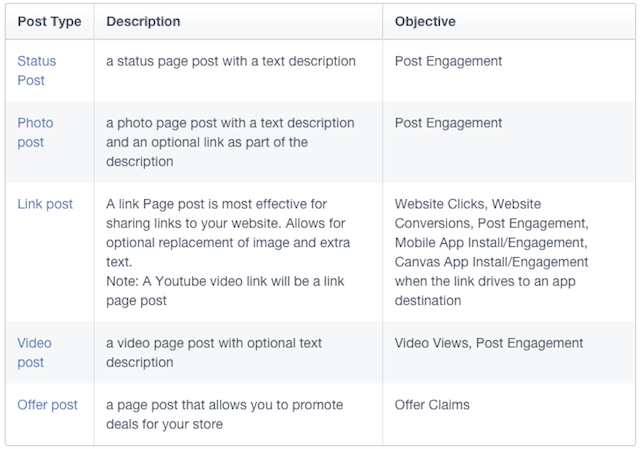
Facebook dark posts are News Feed style ads that don’t publish to your Timeline or in your fans’ feeds organically. A dark post doesn’t have to just be a status update; currently, Facebook supports status updates, photos, videos, links or an Offer.


Facebook Unpublished Page Posts


Why Use Facebook Dark Posts?


Generally speaking, dark posts are a good way to advertise without alienating or annoying your followers. More specifically, dark posts offer two major benefits.


  1. You can get hyper-targeted. With the ability to create as many ads as you want without spamming your followers, you can create hyper-targeted ads for every segment.

  2. You can do A/B testing. For example, you might change the image, headline, body copy or call-to-action button, or change several of these components for more variety. Use this to determine which variations have the highest click-through rates. The higher the CTR, the more money you’ll save on cost-per-click campaigns.


Also, because you can see if certain images or headlines work better, A/B testing enables you to use paid ads to guide your organic social strategy. Once you’ve determined which combinations perform the best, apply them to your organic posts for better reach and engagement.


How to Create Facebook Dark Posts


You already know you can create dark (unpublished) posts from Facebook, but did you know you can also create them through Sprout Social? This will help consolidate your advertising efforts. Publishing dark posts through Sprout is much like publishing organic content.


Using Sprout for Facebook Dark Posts


  • In the top right, click Compose to write your message.

  • Select the Facebook account from which you wish to post.

  • Click on the Facebook icon in the lower left-hand corner.

  • Select Unpublished Post.


BlackOut


Measuring Facebook Dark Posts


Using Facebook dark posts to promote content to a broader audience should lead to more comments/conversations around the content you’re spotlighting. Sprout’s Smart Inbox—and the ability to reply directly to threaded comments—is an efficient way to streamline the management of these conversations and ensure you never miss a message.


Viewing Facebook Dark Posts in Sprout


Sprout’s Sent Messages report also allows you to view data (likes, comments and engagement) for unpublished posts. Here’s how:


  • Go to Reports.

  • In the left navigation, click on Sent Messages.

  • Select Facebook.

  • In the right-hand box, check Include Unpublished Posts.


If you are A/B testing and want to determine effectiveness, leave the filter on, then export the report and manually compare either:


  • Ads versus ads

  • Paid posts vs. organic posts


Blackout2


For those times that you’d like to focus your attention solely on organic posts, leave the filter off, and all unpublished post data will be removed from your Sent Message report. Keep in mind that turning the Include Published Posts filter on or off will automatically update your “totals for this week” and will be reflected in your exported reports, thus giving you full control over how you view and analyze your Facebook Sent Message data.


Want More Insights?


Leave a comment below, and we’ll get back to you. You might even inspire our next Insights article.


The post Shedding Light on Dark Posts: Another Useful Tool in the Facebook Ad Mix appeared first on Sprout Social.


Posted on 7:30 AM | Categories:

Wednesday, March 4, 2015

Are You Spending Too Much on Facebook Ads?


Are You Spending Too Much on Facebook Ads?


Spending too Much on Facebook Ads


Facebook ads can be incredibly fickle and difficult to finesse into a reasonable budget. If you set your targeting options too broad, a $100 budget can vanish in an hour with virtually nothing to show for it. On the other hand, if you set your targeting too narrow, you’ll end up struggling to get Facebook to take your money. At least, if you set blocks to keep Facebook from spamming users with the same ad over and over. Otherwise, yeah, Facebook will be happy to profit from your mistakes.


So, how much should you be spending on Facebook ads?


Considering the Costs


Here’s one way to look at things. Say you want to run advertising for one month. During that time, you would like your ads to pull in 1,000 new fans. You want 500 people to subscribe to your mailing list. You would like to send 5,000 hits to your website, and you want 100 product sales that came from Facebook. You can track this last one using the Facebook conversion pixel, by the way.


Now, the exact costs of each of these actions are going to vary depending on a lot of factors. Your niche matters a lot. B2B pages have a harder time converting than B2C entertainment pages, for example. You’ll have a harder time reaching 100 product sales if your product costs $100 or is a niche specialty product than if it’s a $5 indie game.


Given these factors, the numbers I’m about to quote are just estimations. They’re baselines you should use to keep your expectations sensible. If you find yourself spending significantly less, you’re either lucky or you’re getting fake fans and fake emails. If you’re spending significantly more, you have some funnel optimization to do.


Facebook Fans are first on the list. You want to pull in 1,000 in the span of a month. Consider that the average cost of a new Facebook fan, in terms of ad spend, is about $0.50 to $1. So for 1,000 fans, you can be looking at $500-$1,000. That’s for one month, for a thousands followers, alone.


Email Subscribers are next. You can get these pretty cheap if you have a great product, a highly effective landing page and a good incentive. Still, consider them to be about the same cost as Facebook followers. 500 new subscribers will run you anywhere from $250 to $500 for the month.


Website Clicks are by far the cheapest option, running you anywhere from ten cents to fifty cents. 5,000 hits to your website, then, could run you anywhere from $500 to $2,500.


Product Sales are too variable to list here. For the sake of an example, let’s imagine you have a product that costs $50, and you’re able to get conversions for a mere $10. That’s a sizable profit, and for 100 new sales, you’ll end up spending $1,000.


Total up all of those numbers. For one month, with a fan growth of 1,000, a mailing list growth of 500, a flood of 5,000 users to your website and 100 new product sales, you’ll end up spending anywhere from $2,250 to $5,000. For one single month!


Now imagine you’re a big business, and you want 10x or 100x those individual metrics. 100 product sales is barely a drop in the bucket. 500 email subscribers barely makes a fraction of one segment of your mailing list. Your page has millions of followers, so you need way more than 1,000 to make an impact. Your ad spend can be horrific.


Optimization Factors


The Cost of Reach


And they tell you Facebook is free! It’s such a joke, at least to a seasoned marketer, to think of any platform as free. Still, those numbers are very real. Consider, then, some ways to make them lower.


Anything that helps convert users will drop the cost of doing so. A higher converting landing page, for example, will mean fewer users need to visit your site in order to get a conversion. Fewer users seeing your ad results in less money being spent.


Though, in reality, Facebook isn’t going to stop eating your budget just because your goal is reached. If you budget $1 per new fan, and your ad proves to be extremely effective, so much so that the cost per fan is $0.50 and you reach your 1,000 new followers in half your budget… Facebook keeps going. You spend your full $1,000, but you end up with 2,000 new fans.


Optimizing your ad image, your ad copy, your landing page, etc; it all works to make your costs lower by increasing their efficiency.


Another way to lower your costs is to enhance your targeting. It can be very expensive to target certain interest groups, certain demographics or certain geographic locations. As a general rule, narrowing down the targeted audience you’re attempting to reach will lower their costs, to a certain point. Beyond that point, costs may be low, but you also won’t reach many people.


Another thing to consider is speed. The faster you want to obtain your conversions, the more people will have to see your ads. Thus, the more expensive it will be. Therefore, adjusting your time expectations can decrease your costs. Maybe you don’t need those 1,000 new fans this month, but can go for only 500 per month for two months. That cuts your monthly ad spend in half for that goal. It’s slower growth, but it’s less expensive that way.


Success on Facebook doesn’t need to be extremely expensive. In fact, you don’t need to spend all that much at all, as long as you’re not relying on explosive growth to turn a profit. Moz has a great rundown of what you can get just by spending a single dollar – just $1 – every day, $30 per month, on Facebook ads. It’s entirely possible to use this tiny amount of budget on a monthly basis to grow your page, and rely on organic advertising and brand building to do the rest of your conversion work for you.


Just remember that one of the greatest benefits of Facebook advertising is the scalability. If you want to start by spending $1 per day on Facebook ads, you’re welcome to do so. If you find they have proven beneficial and you now have made enough profit to double your investment, it’s easy to take advantage of $60 per month. If you want to up it to $100, or $500, or $1,000, Facebook has the numbers and the reach to support your budget. It’s all possible. Just make sure you’re not overpaying for individual conversions; that’s where the cost gets you.


The post Are You Spending Too Much on Facebook Ads? appeared first on Boostlikes.com.


Posted on 1:30 PM | Categories:

Monday, March 2, 2015

Measure the ROI of a Promoted or Boosted Facebook Post


Measure the ROI of a Promoted or Boosted Facebook Post


Calculating ROI


Promoting a post on Facebook takes that organic post and converts it into a Facebook news feed ad. That’s all it does. When you boost a post using the “boost post” button, Facebook takes your money, slaps a few basic targeting factors on and laughs all the way to the bank. When you promote a post using the Power Editor, you have more complete control over the targeting and thus can make your post that much more effective.


How much more effective is it than just letting your post run wild? Well, you’ll have to measure it and find out.


Step 1: Set Up Goals


Facebook Goals


The first thing you need to do in order to track the return on investment of your promoted posts is determine what, exactly, your goals are with the posts.


There are a few factors that will be fixed. For one thing, you will know at the time of posting your ad what your maximum budget will be. You plug in a number and tell Facebook to do what it can with that amount of money. Sometimes that entire budget will be eaten up in minutes. Sometimes you will reach the end of your audience without eating through your entire budget. It depends on your targeting, and both are a sign of different targeting factors.


You also know where your ad is going to show up; the news feed. You can use this ROI tracking method for ads in other locations, but specifically promoted posts live in the news feed.


Oh, and as a note, never use the boost post button. It can work very well, contrary to how it used to work. However, it’s still like using a screwdriver to do the job of a crowbar. It can work, but it’s not the best tool for the job, it might take longer and it sometimes breaks.


What goals might you track? Anything, really. It might be website conversions, website clicks, email signups, or anything else. Just so long as it’s something you can track in Google Analytics.


Step 2: Create a Compelling Post


Status Update


Just like when you’re making an ad, making the post you want to promote is going to be very important. It’s going to look like a post in the news feed, with the “sponsored” label, but otherwise no differences. Therefore, it can’t look too advertorial. Instead, you need to be just as casual as you usually are with your posting. Don’t significantly change your voice just for a promoted post.


Make your post an image post. There’s really no disputing this. The only post type with more engagement on Facebook is the video, and right now video ads are limited in capacity and usability. Facebook’s news feed allows for some very large, vibrant images, so make use of the space you’re given.


Write a short bit of text to accompany the image. Try to keep your text under 100 words. Anything longer and you start to lose people who don’t want to read more than a tweet worth of writing at a time. There’s an art to crafting the perfect copy, so take your time.


Finally, include your link. More on that in the next section.


Step 3: Create a Trackable URL


Google URL Builder


The way I’m recommending that you track your URL is through Google Analytics. You can use some other services if you want, however. For example, bit.ly has some basic tracking options for shortened URLs.


I prefer Google’s URL Builder for a few reasons. For one thing, it’s very flexible. For another, it’s not a shortened URL. Many social media users are starting to distrust shortened URLs, because they are often used by spammers to redirect to an ad page, which disrupts the browsing experience. There’s also the benefit that Google’s UTM parameters are used everywhere, so users are used to seeing and ignoring them.


When you use Google’s builder, you will have to put in the URL of the destination page. You do have a landing page, right? Optimizing that is the subject of a whole other article.


You will also have to put in the campaign source, the medium, and the name. Content and term are optional. Source, in this case, will be FB or Facebook, however you want to use it. Medium will be however you want to flag a promoted post. Campaign name will be your individual ad name, such as “PromotedPostVar1”


The reason to add the Var1, for Variation 1, is in case you’re split-testing promoted posts or changing your campaign over time. Later, in Google Analytics, you will be able to see the performance of each individual “campaign” URL.


Step 4: Share Post and Monitor Data


Boost Post Statistics


Once your URL is ready, feed it into your post and share. Promote your post using your budget and the targeting options you want to use. I’m not going to get into how to target a post here; if you’re interested in tracking ROI, you probably know how to specify targeting and how to adjust it for testing variant ads.


Your two tools for tracking everything about this post will be Facebook Insights and Google Analytics. Google Analytics, specifically, will have a section labeled Traffic Sources > Sources > Campaigns. In this section, you will see a list of anything that has a UTM Parameter campaign listed.


Google Analytics, of course, is a deep and varied platform you can use to see just about any possible piece of information you could want about the link you posted. Anything you want to know specifically about the people clicking your link, you can track via Facebook Insights. This includes post statistics as well, so you can see your reach and click rates, and compare them to the conversion rates you monitor through Google. Compare all of that to your goals, and to your spent budget, and you have a picture of your ROI.


The post Measure the ROI of a Promoted or Boosted Facebook Post appeared first on Boostlikes.com.


Posted on 10:46 PM | Categories:

Why Isn’t My Facebook Page Getting Any Results?


Why Isn’t My Facebook Page Getting Any Results?


No results


Facebook is touted as being a source of a lot of traffic and customer benefit, all for free. The reality is, it’s not really free; you have to invest either a lot of time or a little money and a little time to find success. If your budget for Facebook is low, expect to spend plenty of time getting it to work for you.


If you have a Facebook page and you’re wondering why it isn’t working, isn’t bringing in new customers, isn’t engaging your fans, check these common problems.


You Have No Followers


Facebook is contingent on having people following your page. If no one follows your page, no one is around to read your posts. If no one sees your posts, no one clicks your link to your website. There are any number of reasons why you might not have any followers, many of which are covered below. Suffice it to say you’re going to need to do everything in your power to gather up legitimate, interested users to follow your page if you want any success on Facebook.


You Aren’t Posting Often Enough


One of the key elements to getting your posts seen by users is engagement. When users engage with your posts, they see your posts more often. What does this have to do with post frequency? When you post less often, there are fewer chances for users to engage with your brand. If no one has engage with your brand recently, the chances of them seeing your posts will be pretty low. The less you post, the less people see your posts, and the less your posts are shared. Try to post at least once a day, every day.


You’re Posting Too Much Crap


The flip side of the coin, if you’re posting frequently, is that you may be posting content no one cares about. Constant minor internal updates about your office politics are pretty worthless. Updates about who your CEO is meeting and why that’s important on a B2B perspective can be good, but only if you’re marketing B2B on Facebook. It’s no good for B2C relationships.


If you’re curating content, make sure that content is compelling and valuable. You can’t just share anything that comes into view, not if you expect to keep on the good side of your users.


You’re Too Advertorial


Facebook is on a crusade against advertising in your organic posts. There’s a place for advertising, and that’s through Facebook’s PPC advertising platform. If you’re posting advertorial content, you’re posting against the rules Facebook has established. This means Facebook may remove your posts or punish your page. It also means that the average user is going to be more averse to following your page. Users don’t like subscribing to commercials; they want content of real value.


You’ve Been Flagged as Spam


This one occasionally happens if you’ve posted the same message numerous times, or if the content you post leads to sites that look like spam sites. If enough users flag your content as originating from a spam site, or as bearing the hallmarks of spam, Facebook will take a look. If they agree, your page will be penalized for being spam page. In this case, you’ll be lucky if you aren’t removed entirely.


You’re Too New


Pages take a while to get going. Building your first hundred followers will take a while. Building your first thousand will take longer still. At some point you’ll reach critical mass and you’ll be able to convert your leverage into business benefit, but that point isn’t easy to reach. You need to give it time, while enacting positive strategies throughout the rest of your marketing.


You Haven’t Gone Public


This is a rare one, but we see it occasionally. Page Admins are able to hide their page from public viewing, typically while they make major changes or prepare a site for launch. You might have hidden your page to clean up spam, or forgotten to make your page public when you went live. If no one can find your page, it does you no good.


You’re Not Doing Any Promotion


Facebook is not a passive source of value. You need to put a lot of work into getting it out there, in front of your users. This means promotion, how ever you choose to promote. You might send it out in a special message to your email subscribers. You might add a Facebook page signature to your emails. You might add social sharing buttons to your website. You might go all-in with word of mouth advertising. You might run PPC ads, both on Facebook and through Google.


The point is, you need to promote your page if you want users to find it. Only once you reach a certain critical threshold does your page become self-sustaining, where posts being shared puts them in front of enough other people that they further grow.


You’re Too Obviously Automated


Automation can be helpful, but if all your Facebook feed is doing is reposting the messages you scheduled on Twitter, complete with hashtags, you’re doing automation wrong. It’s incredible detrimental to look like your page is managed by a robot. No one will engage, because they can’t expect a response. No one will follow, because they can just check your website occasionally to see anything they missed. Proper automation is great; bad automation is a page killer.


You’re Ignoring Engagement


What do you do when a user comments on a post you made? Do you add a response? Do you go out of your way to respond as quickly as possible, or do you wait until the next time you sign on to reply? The proper way is to set up alerts to let you know when a user comments, so you can thank them for their comment or respond in a valuable, insightful way.


You’re Ignoring Multimedia


If you had to guess, which types of posts would you assume get the most engagement and bring the most value to your business? The answer, believe it or not, is images and videos. Users love images, and video on Facebook is quickly becoming as big or bigger than YouTube. Multimedia is essential to the success of a modern Facebook page. There’s just no valid substitute.


The post Why Isn’t My Facebook Page Getting Any Results? appeared first on Boostlikes.com.


Posted on 12:45 PM | Categories: